Mahasys Multi Zenith

MaintiQ CMMS · Live demo

Stop firefighting. Know what breaks, who is on it, and what is due next.

MaintiQ CMMS puts breakdowns, work orders, preventive maintenance, spare parts and calibration in one place. Explore a live, read-only demo built around a packaging and utilities plant. Request your account in two minutes.

Our team sends your login by email, usually within one business day.

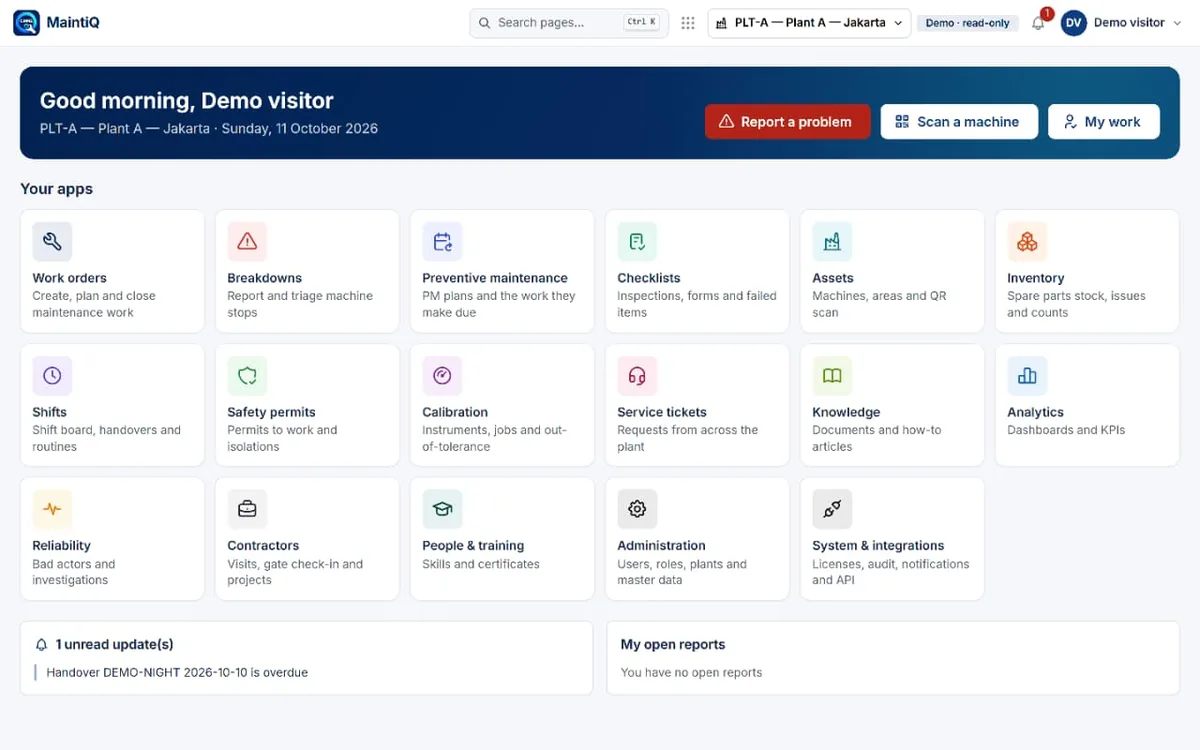
MaintiQ home screen with sixteen app tiles including work orders, breakdowns, preventive maintenance and inventory
16
apps, from breakdowns to analytics
A / B / C
asset criticality on every machine
SLA
clocks on breakdowns and service tickets
Phone
ready: report and acknowledge from the floor

Seven maintenance headaches — and what MaintiQ does about each

Every screen below comes from the live demo. The scenario is a packaging and utilities plant: filling machine, labeler, case packer, conveyor, air compressor, boiler, cooling tower and chiller.

The pain

“A machine stops, someone calls someone, and nobody knows who is actually on it.”

How MaintiQ solves it

Every breakdown in one queue, with a clock running

Operators report a problem in a few taps. It lands in a triage queue with priority, machine, the symptom and how long it has been waiting. A technician presses Acknowledge, so the whole shift can see it has an owner. Anything late is flagged in red.

  • Triage queue and “My reports” in one screen
  • Priority, symptom and minutes late on every card
  • One-tap Acknowledge, so ownership is visible
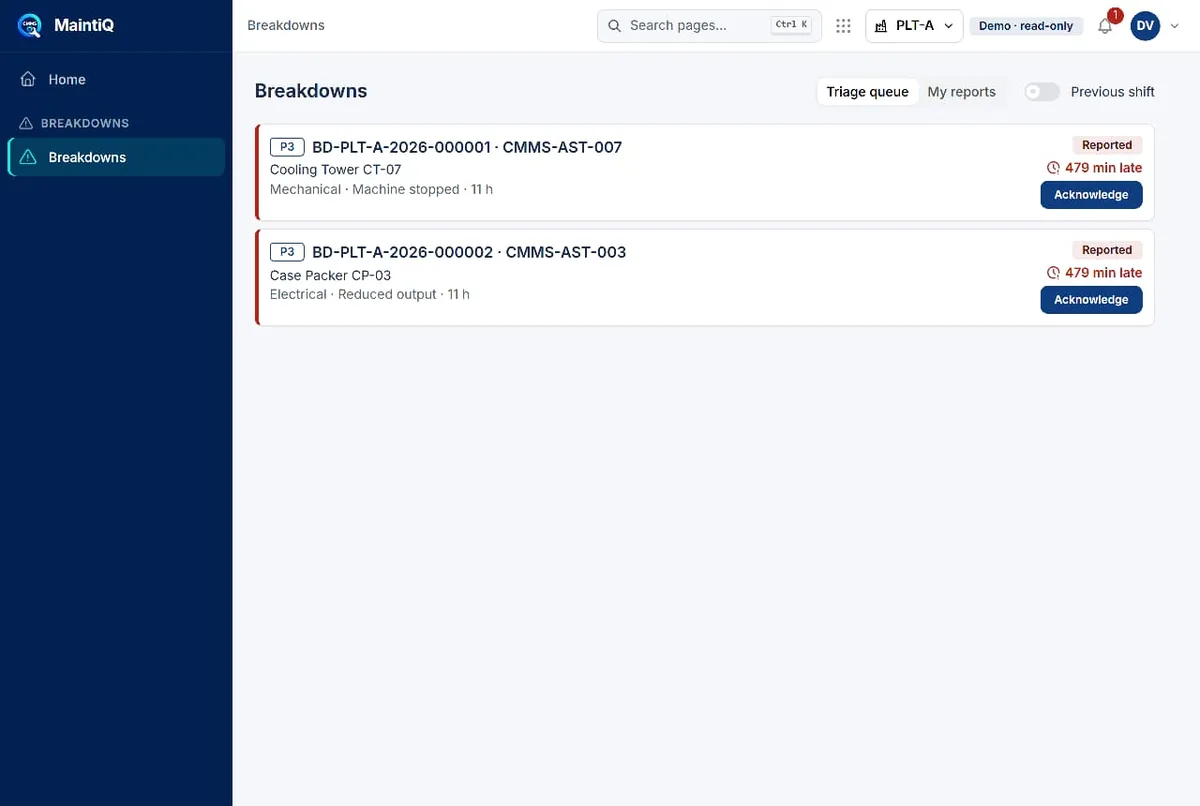
Breakdowns triage queue with two open reports, priority tags, minutes late and Acknowledge buttons

The pain

“Preventive maintenance lives in Excel and a whiteboard. Things get missed.”

How MaintiQ solves it

PM plans that generate their own work

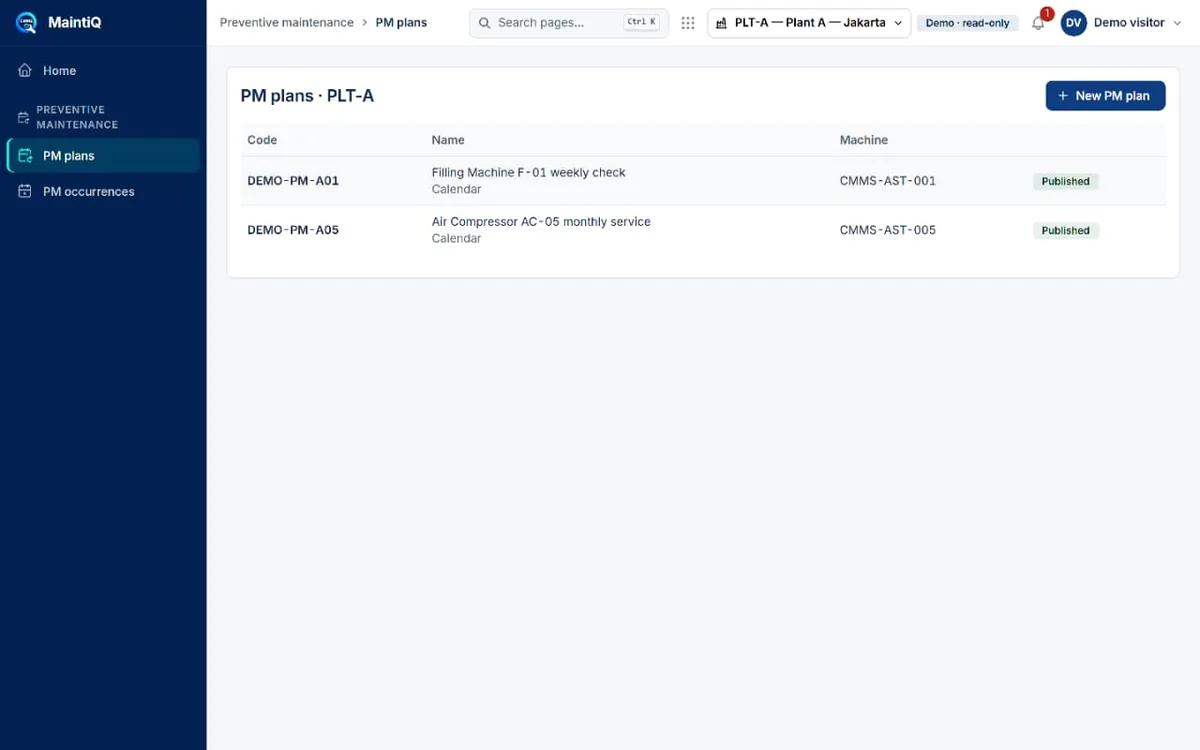
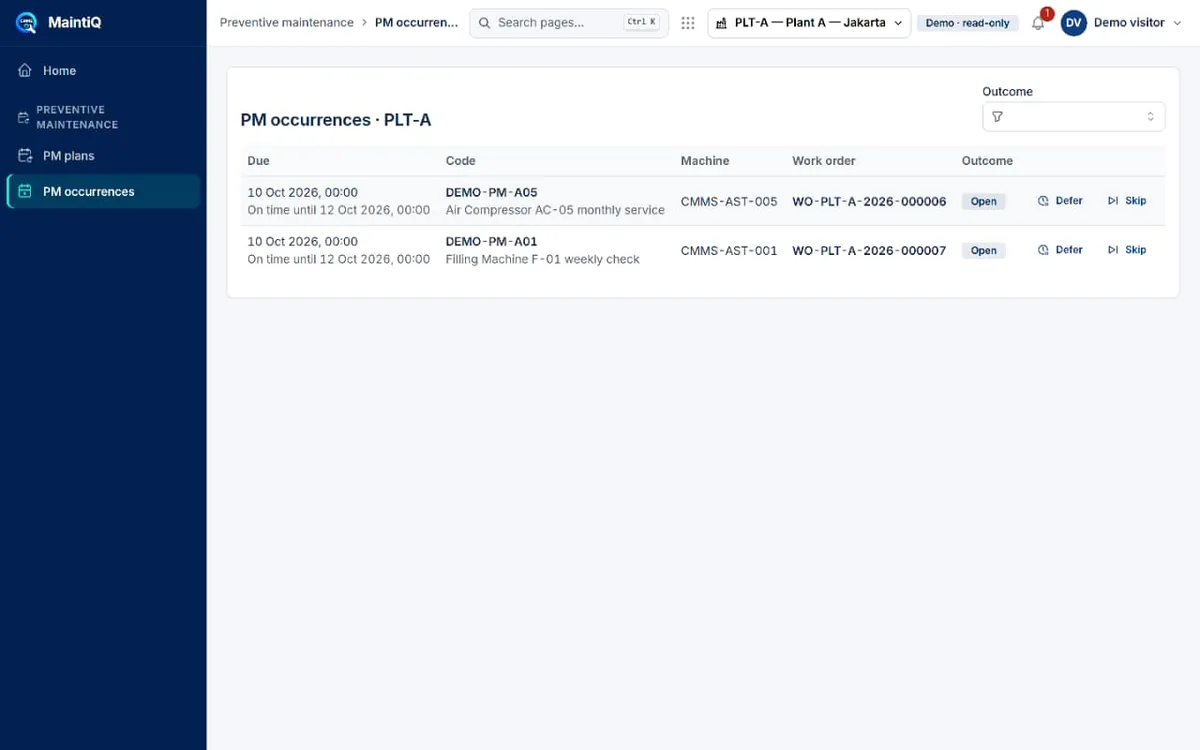
Define a PM plan once for a machine and its interval. MaintiQ creates the due occurrences, ties each one to a work order, and lets the planner defer or skip with a recorded outcome. Nothing quietly falls off the calendar.

  • Published PM plans per machine, with the schedule type
  • Occurrences with due date, linked work order and outcome
  • Defer or skip is a recorded decision, not a silent miss
PM plans list with two published plans for the filling machine and the air compressor PM occurrences table with due dates, linked work orders and Defer or Skip actions

The pain

“Work orders are on paper, so we can’t see what is waiting, what is stuck and what is done.”

How MaintiQ solves it

Work orders you can see as a list, a board or a calendar

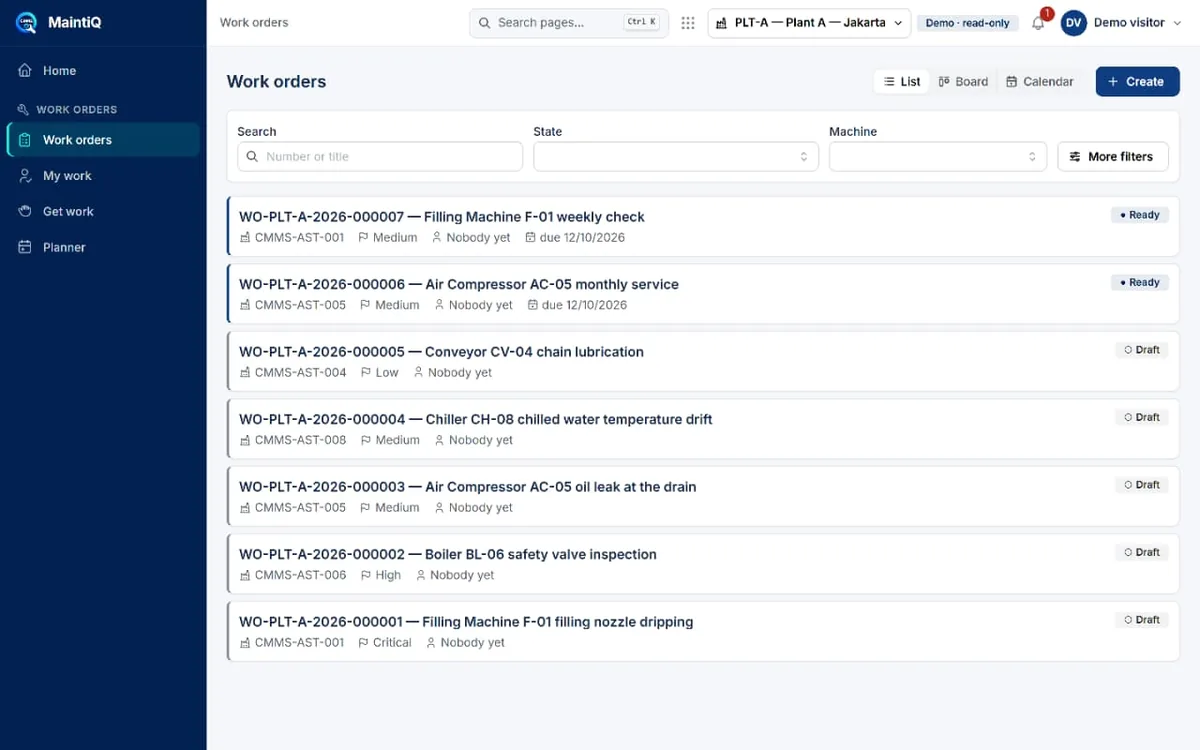
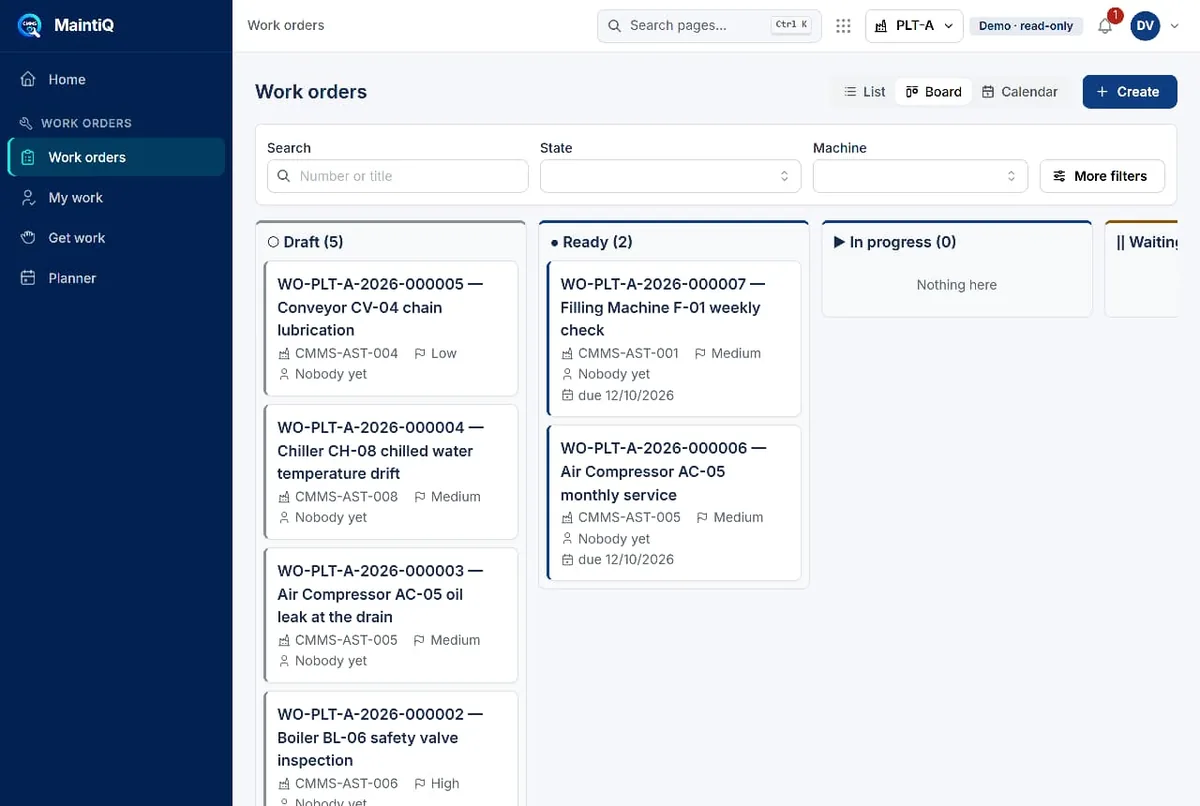
Create, plan and close maintenance work in one system. Switch between the list and a Draft → Ready → In progress board, filter by machine or state, and see who is assigned and when it is due. “Get work” and the planner help technicians pick up the next job.

  • List, board and calendar views of the same orders
  • Machine, priority, assignee and due date on each card
  • Planner with shift capacity so work isn’t over-promised
Work orders list with seven orders, their states, priorities and machines Work orders board with Draft, Ready and In progress columns

The pain

“Production keeps sending requests by WhatsApp, and half of them get lost.”

How MaintiQ solves it

Service tickets with first-response and resolution deadlines

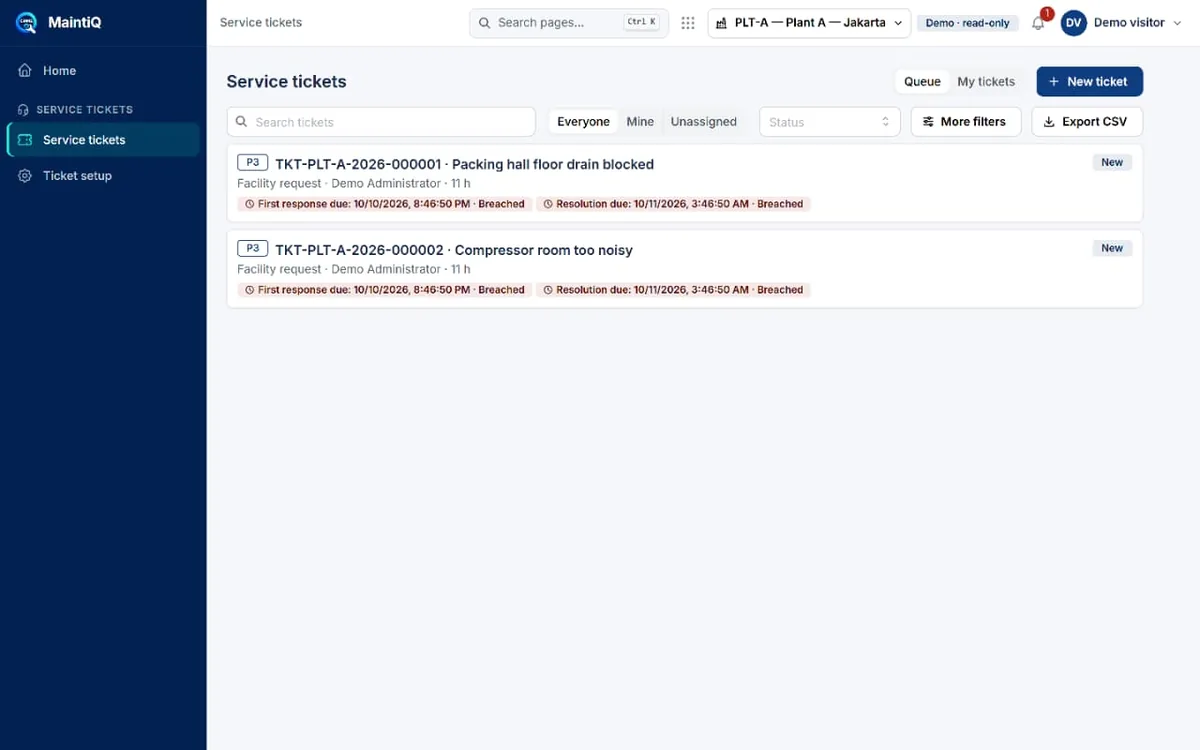
Requests from across the plant, including facility issues, go into one queue. Each ticket carries a priority and two clocks: first response due and resolution due. A breach is visible straight away, not at the end of the month.

  • Queue, “Mine” and “Unassigned” filters
  • First-response and resolution deadlines with Breached markers
  • Export to CSV for your own reporting
Service tickets queue with two P3 tickets, response and resolution deadlines marked Breached

The pain

“We don’t even have one clean list of our machines and how critical each one is.”

How MaintiQ solves it

A single asset register with criticality and live state

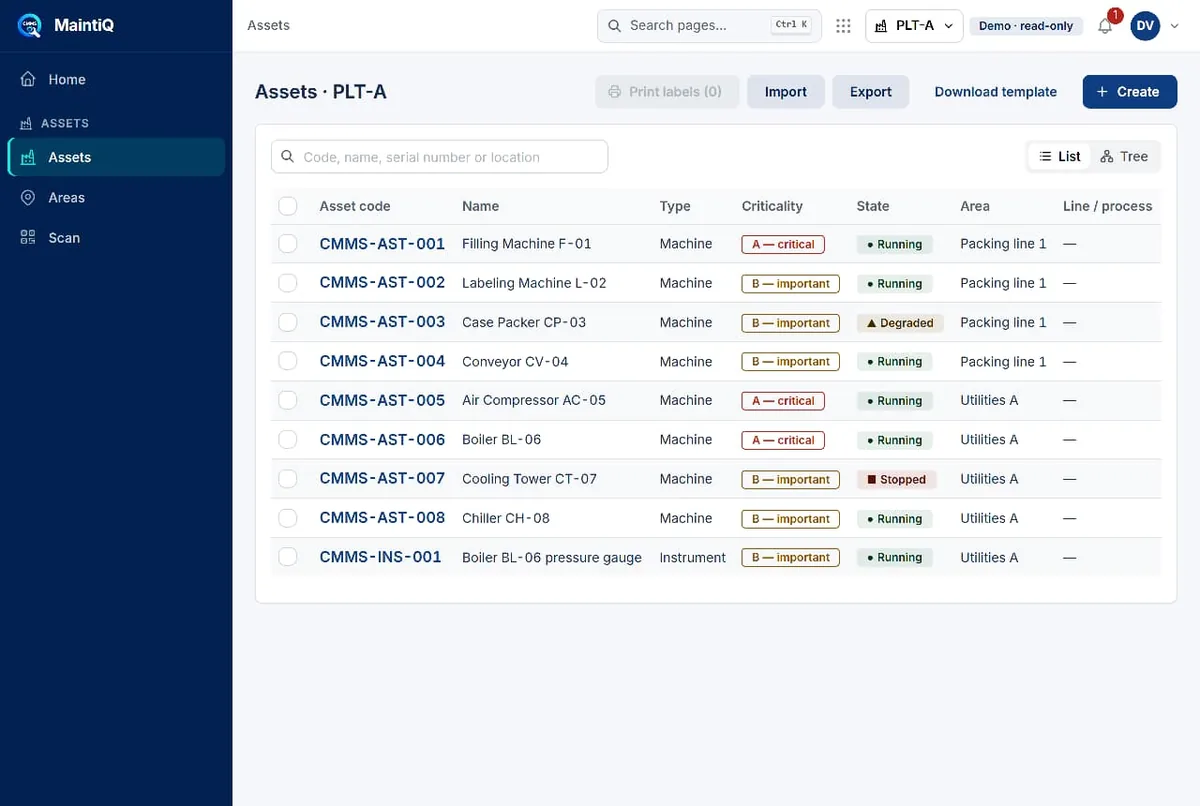
Every machine and instrument with its code, type, criticality (A, B or C), state (Running, Degraded, Stopped), area and line. Import from Excel, export, print labels and scan a machine’s QR to jump straight to it.

  • Criticality A / B / C drives how urgently work is treated
  • Running, Degraded and Stopped at a glance
  • List and tree views, import and export, QR label printing
Assets register with machine codes, criticality, state and area

The pain

“The breakdown is ready to fix, but the spare part isn’t on the shelf.”

How MaintiQ solves it

Spare parts with stock, reorder points and low-stock flags

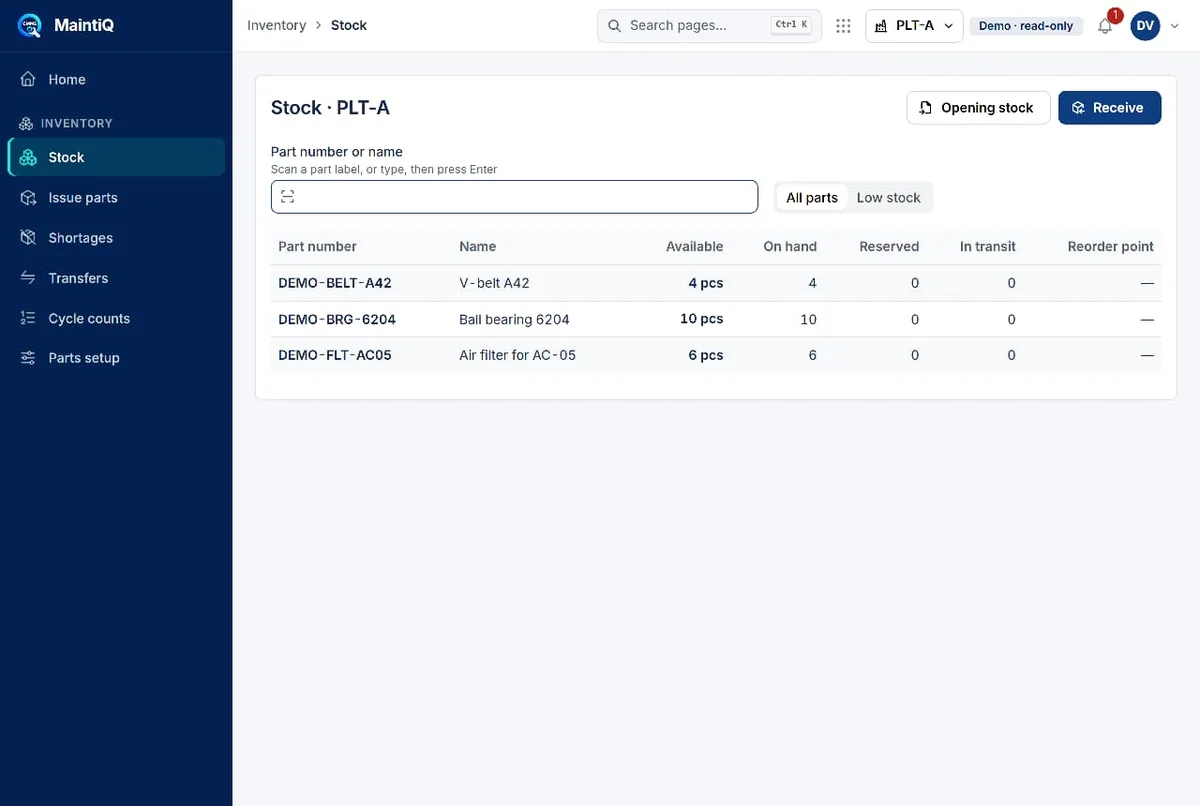
See available, on-hand, reserved and in-transit quantity for each part, and filter to low stock. Receive parts, issue them to work orders, move stock between locations and run cycle counts, so the part is there when the job is.

  • Available, on hand, reserved and in transit per part
  • Receive, issue, transfer and cycle-count flows
  • Shortages view for parts you are about to run out of
Inventory stock page listing a V-belt, a ball bearing and an air filter with quantities

The pain

“The night shift doesn’t know what the day shift left open.”

How MaintiQ solves it

Shift handover that carries open breakdowns forward

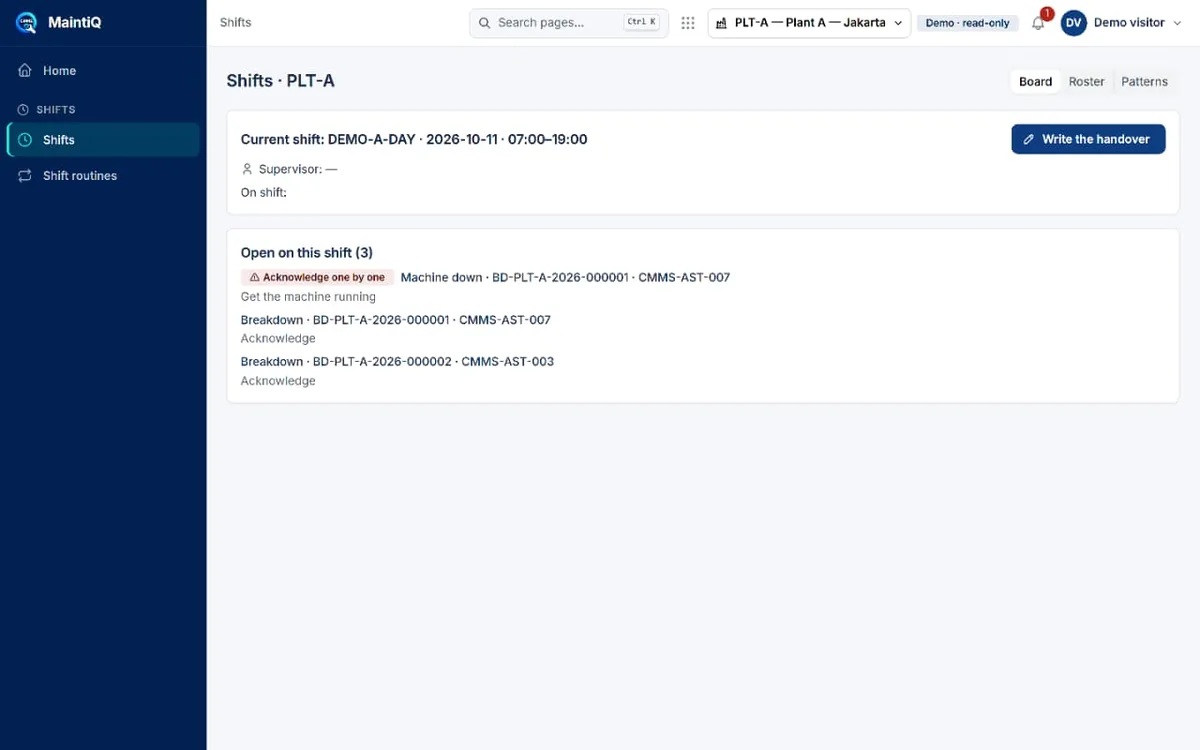
The shift board shows the current shift, who is supervising and every breakdown still open, with an acknowledge action. The outgoing shift writes a handover, and an overdue handover shows up on the home screen.

  • Open items on the shift, carried across the handover
  • Board, roster and patterns views
  • Overdue handover reminder on the home screen
Shift board with the current shift, open breakdowns and a Write the handover button

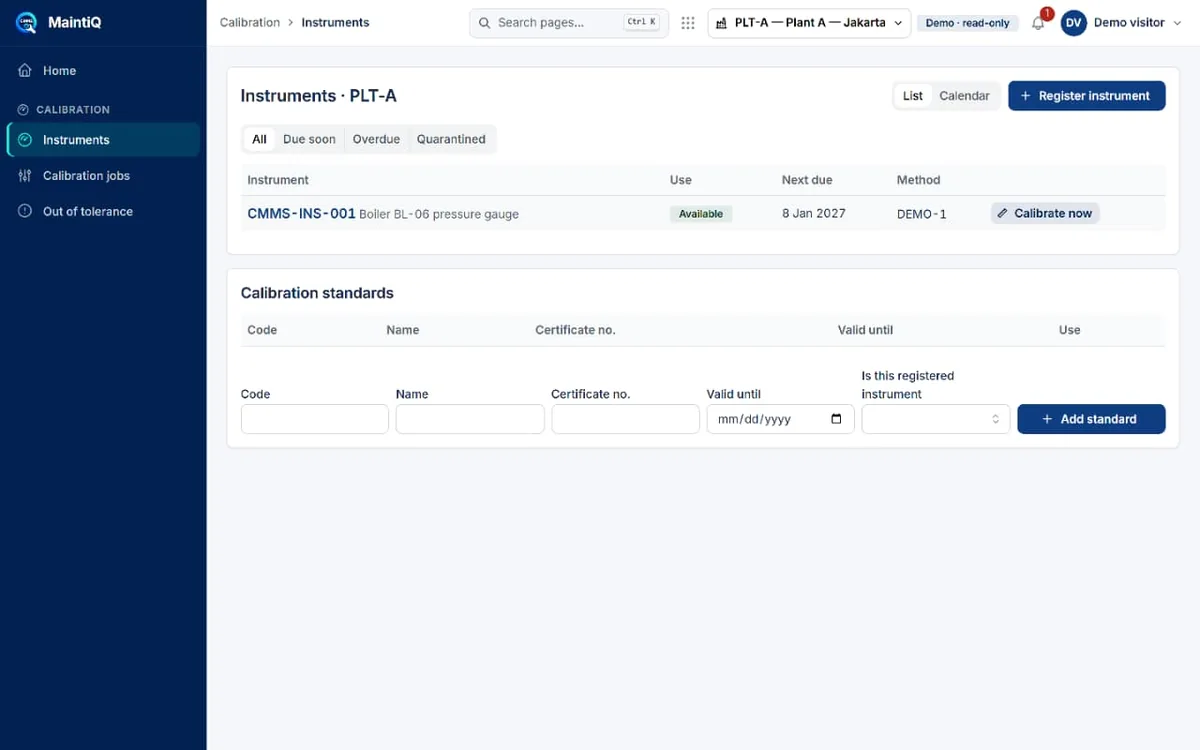
“Our auditor asks for calibration records and we start digging.”

Calibration, tracked per instrument — with a due date

Register instruments and calibration standards with certificate numbers and validity dates. See what is due soon, overdue, or out of tolerance, and record a calibration straight from the instrument. The record is there when the auditor asks.

Calibration instruments page with a boiler pressure gauge, its next due date and a Calibrate now button

Built for the shop floor

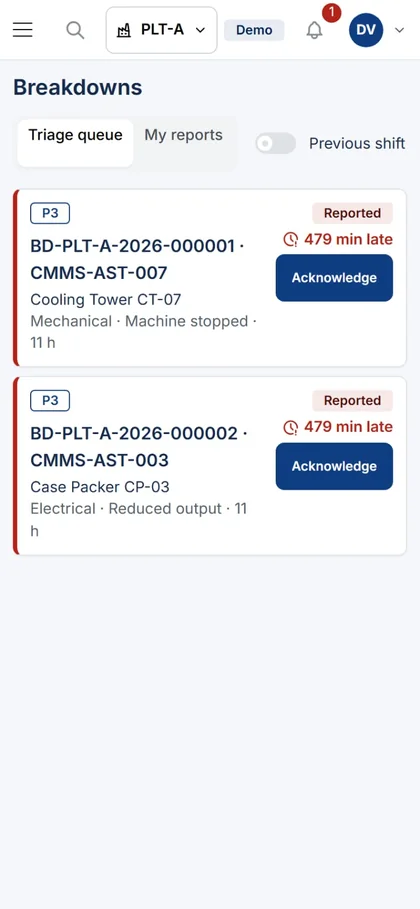
Report and acknowledge from your phone.

MaintiQ adapts to a phone with a compact header and large buttons. Operators report a problem where it happens; technicians acknowledge a breakdown without walking back to a PC. The same triage queue, the same clocks.

Breakdowns triage queue on a phone with Acknowledge buttons

How the demo works

  1. 1

    Tell us about your plant

    Fill in the short form below: machines, users, project start and your biggest pain point. Two minutes.

  2. 2

    Receive your login

    Our team emails the demo address, user and password — usually within one business day (Mon–Fri, 09:00–17:00 WIB).

  3. 3

    Explore every app

    Start at Breakdowns and Work orders, then look at PM plans, Assets, Inventory and Analytics to see how one event connects to the next.

The demo is read-only and runs on simulated data, so you can open every screen but nothing is saved. A few apps, such as Knowledge and Contractors, have no sample data yet.

Request demo access

Get your demo account

Tell us a little about your plant. We use your answers to point you to the screens that matter most — and to tell you honestly whether MaintiQ fits.

Machines and assets you’d like to maintain in the system. A rough number is fine.

People who would log in: technicians, planners, supervisors, requesters.

By sending this form you agree that we may contact you about your request. We don’t share your details.

Questions before you request access

Is the demo using my plant’s data?

No. The demo runs on simulated data for a packaging and utilities plant. It is read-only, so you can browse every screen but nothing you do is saved.

How long until I get my login?

Usually within one business day (Monday to Friday, 09:00–17:00 WIB). Our team sends the demo address, user and password by email. Accounts are issued by hand, so please use a work email you check.

Why do you ask for machines, users and project start?

So we can prepare a walkthrough that fits your plant and tell you honestly whether MaintiQ is a match. We don’t share your answers, and we don’t add you to a newsletter.

Can technicians use it on a phone?

Yes. MaintiQ adapts to a phone with a compact header and large action buttons, so operators can report a problem and technicians can acknowledge a breakdown from the floor.

Does it cover preventive maintenance as well as breakdowns?

Yes. PM plans generate due occurrences linked to work orders, and breakdowns have their own triage queue with deadlines. Both feed the same work order and analytics views.

What does MaintiQ CMMS cost?

Pricing is project-based because every plant is scoped differently: number of assets, users and integrations. Share your details in the form and we’ll come back with a quote after the demo.

Fewer surprises, more planned work.

Ask for a demo account and see your maintenance pain points answered on screen.

Request demo access